ZeroBytes POS: a restaurant till that works offline
ZeroBytes POS is our own software, not a client project. It is a Windows point of sale for restaurants, built for how they actually run in Bangladesh: orders, tables, kitchen tickets, bills and the day's report all work against a database on the machine itself. The floor keeps moving when the connection does not, and everything catches up on its own when it returns.
- 0
- Network calls to ring up a salethe write lands on the machine first
- 2
- Languages, on every screenEnglish and Bangla, numerals included
- 4
- Ways to settle a billcash, bKash, Nagad, card, or split across them
- 1
- File to installyour menu and your floor already inside it
What it does
In the order a shift uses it.
Order entry
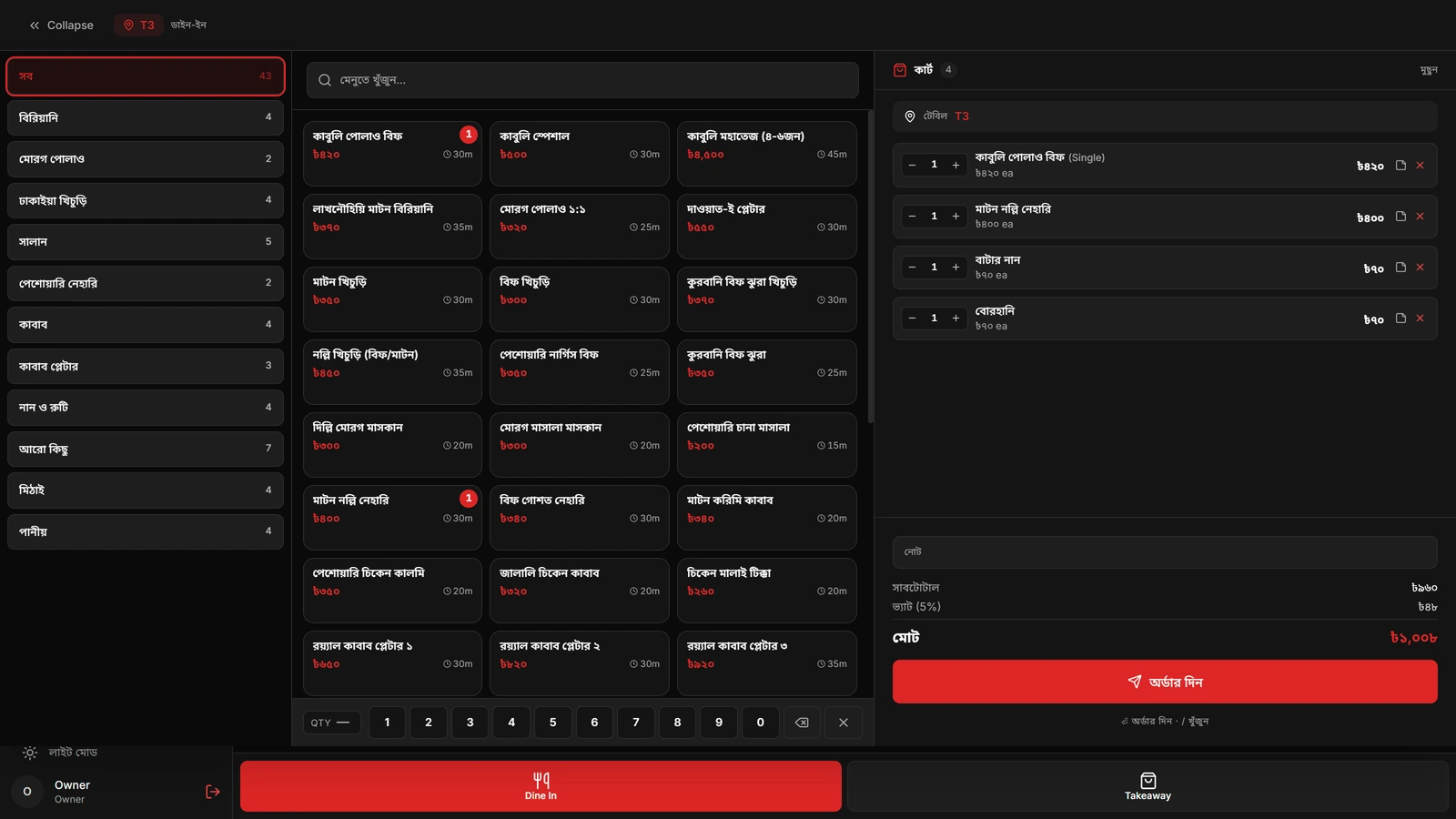
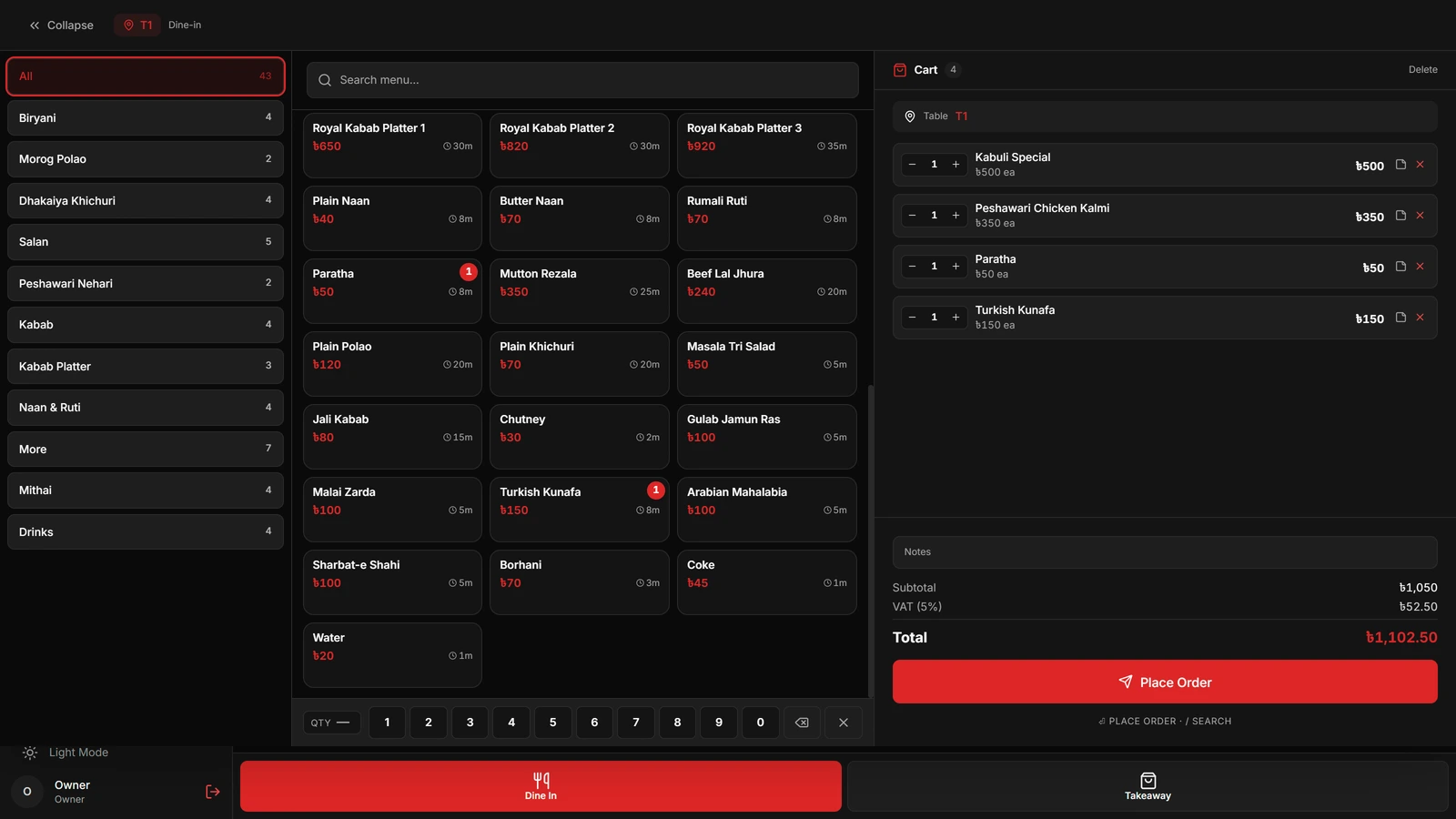
Pick a table or start a takeaway, tap through the menu, set quantities on the numpad, leave a note for the kitchen. The cart carries the subtotal, the VAT and the total as it grows, so nobody is adding up in their head at the counter.
Floor plan
Sections and tables laid out the way the room is, each one coloured available, occupied, reserved or needs attention. Tapping a table opens its order; the floor and the till are the same screen rather than two that have to agree.
Kitchen tickets
Every item carries a station and a prep time. The ticket prints where the dish is actually cooked, the grill does not get the dessert order, and the paper carries the Bangla name alongside the English one.
Bills and payment
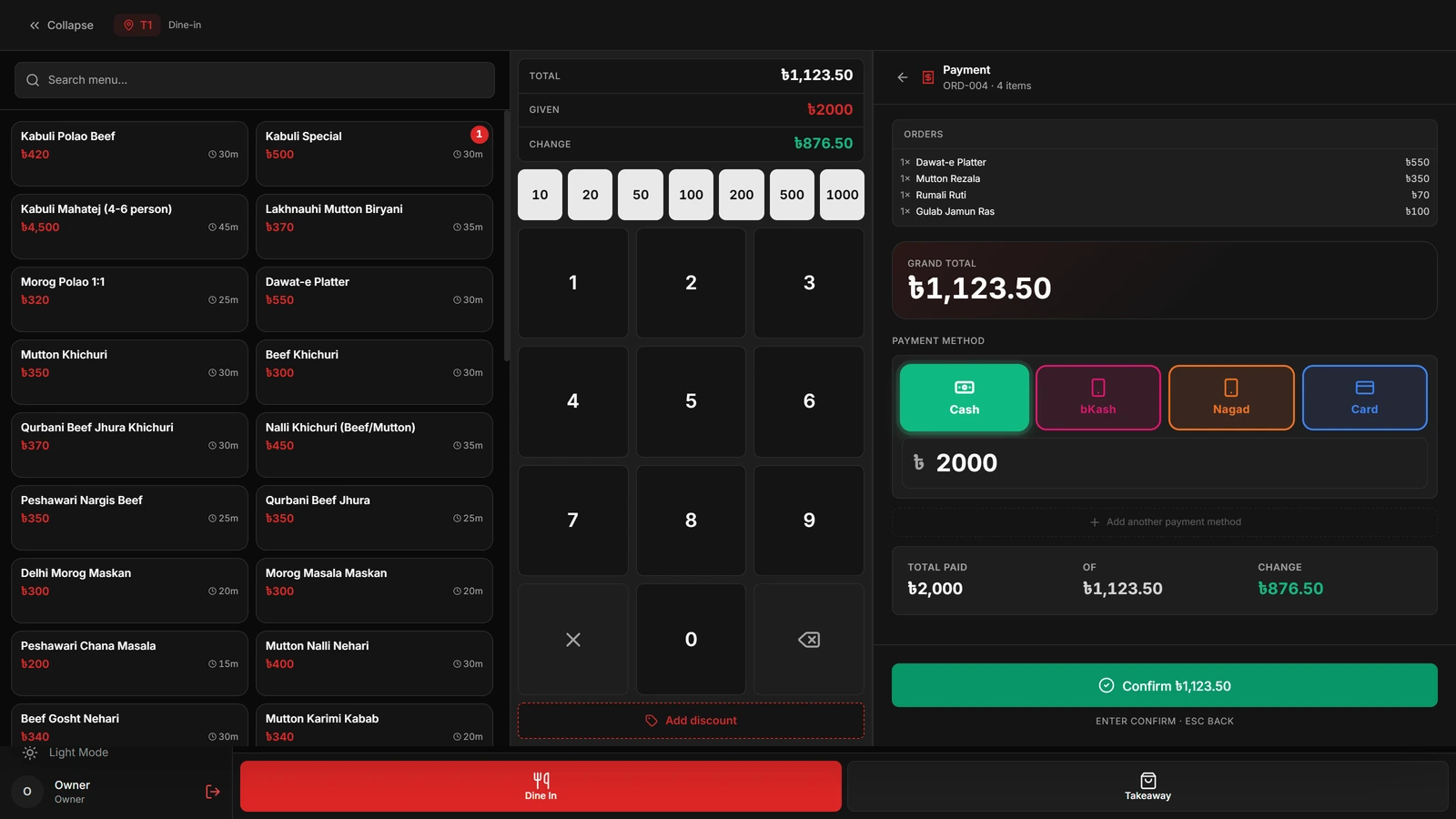
Cash, bKash, Nagad and card, one bill split across more than one of them, tendered and change worked out for you. Each bill takes an invoice number of its own, which is the identifier a VAT audit or a customer reprint looks up.
Offers and discounts
Percentage or flat, on an item or on the whole bill, buy one get one and cross item offers. What was discounted and by whom is recorded on the bill rather than absorbed silently into the total.
Reservations
Bookings against real tables, so a table held for eight o'clock shows as reserved on the floor rather than living in a notebook by the door.
Reports
The day's orders, revenue, average order, VAT collected, the split between payment methods, the hourly peak, the top sellers and every void. Any date range, and CSV out of it.
Staff and shifts
Five roles from owner down to waiter, each with its own permissions. The rest of the app stays locked until somebody opens today's shift, and every sale carries the name of whoever was on it.
What happens when the internet goes.
Nothing. That is the whole design, and it is worth being specific about why, because "works offline" is a claim every till makes.
The local database is the real one
Each write is a single transaction against SQLite on the machine, and the screen updates the moment it commits. There is no request in that path, so there is nothing for a dead line to interrupt.
An outbox, not a retry loop
The same transaction queues the change with a sequence number for that terminal. When the line returns, the queue drains in order, and the server rejects anything it has already seen. A connection that dies mid send cannot bill a table twice.
Two tills stay level
Each terminal keeps its place in the server's log and pulls forward from there, so a second machine on the same floor picks up what the first one did without either of them being told to.
Conflicts have one rule
An open order belongs to the floor and the terminal wins. A paid or voided bill is a financial record and the server wins. That is the entire policy, and it matches what a restaurant already believes about its own paperwork.
Built for the room it runs in.
The things below are the reason a restaurant in Dhaka does not have to work around this software.
Bangla, not a translation layer
Every label switches, and so do the numerals, a total reads ৳১,০০৮, not ৳1,008. Menu items, categories, staff names and sections each carry a Bangla name of their own beside the English one, and the receipt prints whichever the restaurant set.
VAT the way NBR wants it
VAT is applied per item at the rate the restaurant is on, the Mushak BIN prints on the invoice, and the report separates VAT from supplementary duty so the monthly return is a read rather than a reconstruction.
The money people actually use
bKash and Nagad sit beside cash and card as first class tenders, not as a note typed into a comments box, and one bill can be settled across several of them.
Delivery apps, with the cut visible
Foodpanda and Foodie can be switched on with the commission each platform takes, and an item can be priced differently per channel so the listed price absorbs the cut instead of the kitchen doing it.
The printer already on the counter
Thermal invoices and kitchen tickets on 58mm or 80mm paper, laid out for the character counts those rolls actually give you rather than scaled down from A4.
The screens
Captured from the running application, against a demonstration restaurant.


How you get it.
There is no setup wizard for you to work through, because the setup happens before the file reaches you.
- 1
You send us the menu
Categories, items, prices, Bangla names, sizes, prep times and which station cooks what. A photograph of the printed menu is a fine place to start.
- 2
And the shape of the room
Sections and tables with their seating. Skip it entirely if you only do takeaway and delivery.
- 3
We build your installer
One file, with your restaurant, your menu, your floor and your staff logins already inside it. Not a generic download you then have to fill in.
- 4
It runs on the till
Windows. First launch sets up its own database and it is ready to sell. Add a second terminal later and it catches up on its own.
- 5
Backup is a switch
Turn cloud backup on and every change is pushed to the hosted server as the line allows. Turn it off and the restaurant's data never leaves the building.
The facts
- Runs on
- Windows desktop application
- Languages
- English and Bangla
- Data
- SQLite on the terminal, PostgreSQL on the server
- Terminals
- One or many, per restaurant
Want it in your restaurant?
Send us your menu, even a photograph of the printed one, and tell us how many tables and tills you run. We will tell you what it costs and build your installer.